
8 Best Car Tablets in 2026
This post contains affiliate links. As an Amazon Associate, we earn from qualifying purchases.
The Lehwey Portable Wireless Carplay Tablet earns our Best Overall pick because it combines navigation, entertainment, and a full dash-cam system with front and rear coverage in one device. For families, the Seventour 12.4″ Android Car Headrest Monitor offers a large back-seat screen, while the AGM PAD P2 Active Rugged Tablet is our choice for those who need durability on rough roads.
A car tablet needs to do more than just play videos. You need to consider mounting options, power requirements, screen visibility in sunlight, and whether the tablet can handle the temperature extremes inside a parked vehicle. A tablet that works great on the couch may fail in a car.
We built this guide by comparing specifications, manufacturer documentation, and patterns in owner feedback across eight different models. Our goal is to help you match the right tablet to your specific driving needs, whether that is keeping kids entertained, navigating with GPS, running work software, or recording the road.
Top 8 Car Tablets in the Market
Certain content that appears on this site comes from Amazon. This content is provided "as is" and is subject to change or removal at any time.
The Best Car Tablets, Reviewed
Lehwey Portable Wireless Carplay Tablet
What We Like
- Built-in 4K front dash cam
- Wireless CarPlay and Android Auto
- Split-screen shows front and rear views
- Includes 64GB TF card for recording
Trade-offs
- Requires cigarette lighter power for operation
- Weighs 2.5 pounds, requires secure mounting on a flat surface
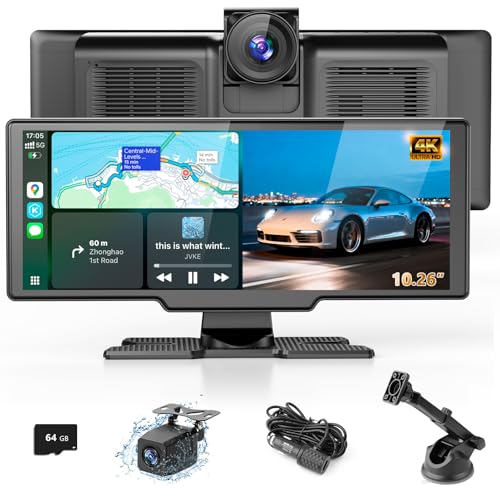
A 10.26-inch IPS touchscreen with a 4K front dash cam and a 1080P rear backup camera makes this tablet a true all-in-one driving companion. You get navigation, hands-free calls, music, and continuous recording from both ends of the car without juggling separate devices. The split-screen function lets you watch the road ahead and behind at the same time, which is exactly what you want when parking or merging. For someone who wants to upgrade an older vehicle with modern convenience and safety features in one tidy package, this setup covers the essentials without extra clutter.
The trade-off is weight and power dependency. At 2.5 pounds, this unit needs a clean, flat surface for the adhesive or suction mount to hold securely. It also runs off the cigarette lighter, meaning you cannot use it as a portable tablet away from the car. If your priority is a dedicated driving hub with integrated cameras rather than a multipurpose tablet you can take inside, this is the better fit.
AGM PAD P2 Active Rugged Tablet

What We Like
- IP68 & IP69K waterproof and dustproof
- 1.8-meter drop resistance
- 8000 mAh long-lasting battery
- Widevine L1 for HD streaming
Trade-offs
- At 3.1 pounds, heavy for handheld use
- 0.3-inch thickness adds bulk in tight spaces
The AGM PAD P2 Active carries an IP68 and IP69K waterproof rating plus a 1.8-meter drop resistance, which means it can survive being dunked in water, blasted with high-pressure jets, and dropped from a truck seat onto concrete. For anyone using a tablet in a workshop, on a job site, or during off-road trips where dust, rain, and bumps are part of the routine, this is the one that keeps working when a regular tablet would quit. The 8000 mAh battery also means you can run navigation, music, or video for a full workday without hunting for an outlet.
At 3.1 pounds, this tablet feels more like a rugged tool than a slim entertainment slate. The 0.3-inch thickness keeps it pocketable in a bag, but it’s heavy enough that you’ll notice it in hand after a while. If you’re comparing to a dedicated headrest monitor, the trade-off is clear: the AGM PAD P2 Active is built for drops and water, not for lightweight mounting on a seat back.
Seventour 12.4" Android Car Headrest Monitor

What We Like
- Large 12.4" 1080p IPS touchscreen
- Wireless phone mirroring (iOS & Android)
- HDMI input for game consoles
- OTA system updates
Trade-offs
- Only 16GB built-in storage
- Android 10.0, not the latest version
A 12.4-inch 1080p IPS touchscreen turns the back seat into a personal theater, with enough size and clarity for kids to watch movies or play games on long drives. The Android 10.0 operating system lets you download apps like Prime Video directly, and wireless screen mirroring from a phone means you can share content without cables. For families who want a dedicated entertainment station that mounts right onto the headrest, this monitor delivers a full smart-TV experience in the car.
The internal hardware is modest: 2GB of RAM and 16GB of storage are enough for streaming and basic apps, but power users who load many games or run heavy programs may notice some lag.
Product photos
NOAUKA 10.1" Android Car Headrest Tablet

What We Like
- Android 13 with Google Play access
- Wireless phone mirroring via AirPlay/Miracast
- HDMI input for external devices
Trade-offs
- FM must be off when using Bluetooth headset or speaker
- Requires phone hotspot for internet access
- Wired AV cable needed to mirror video between two units
A 10.1-inch touchscreen running Android 13 gives this headrest tablet the versatility of a full media player, not just a DVD screen. You can download YouTube, Netflix, or Prime Video from Google Play, connect your phone’s hotspot for streaming, or mirror content wirelessly from an iPhone or Android device. That makes it a strong fit for families who want each kid watching their own show without fighting over a single tablet. The included mounting kit and cigarette-lighter adapter keep installation straightforward in most cars.
The NOAUKA 10.1″ Android Car Headrest Tablet is a dedicated back-seat entertainment system, not a multi-tool like the Lehwey Portable Wireless Carplay Tablet, which includes a dashcam and backup camera. Internet access relies on your phone’s hotspot, so data caps or weak signals can interrupt a movie. To play the same video on two screens, an AV cable is required instead of a wireless sync.
Product photos
Seventour 14" Android Car Headrest Monitor
What We Like
- 14-inch IPS screen with 2240×1400 resolution
- Android 13 with Google Play Store access
- Wireless phone mirroring via AirPlay and Miracast
- HDMI input and output for game consoles
Trade-offs
- No built-in battery; requires constant car power to run.
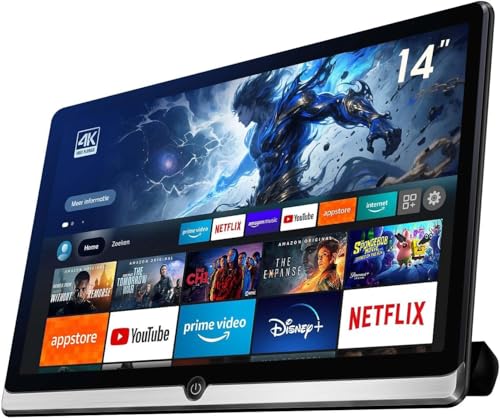
A 14-inch IPS touchscreen with 2240×1400 resolution gives passengers a clear, detailed picture for watching shows or playing games. Running Android 13, this monitor lets you download Netflix, YouTube, or Disney+ directly from Google Play, so kids can stream their own content without a separate device. The metal mounting bracket fits most cars, and the wireless mirroring feature lets the driver control content from the front seat. For families that need a large, bright screen for long road trips, this size delivers.
Product photos
MobileDemand Flex 10D Rugged Tablet
What We Like
- Survives 4-foot drops in harsh environments
- Bright 340 NIT screen works in sunlight
- Windows 11 Pro runs field software directly
- Vehicle-mountable with Snap Mount System
Trade-offs
- Keyboard sold separately for laptop mode
- Heavier and bulkier than consumer tablets
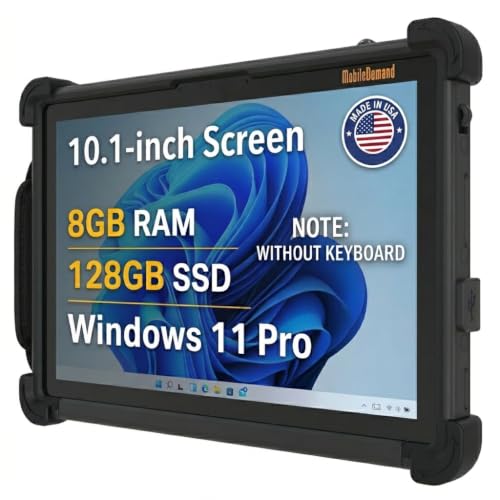
A 4-foot drop rating means this tablet can survive a fall off a forklift or workbench and keep running, which is exactly what you need in a warehouse or on a construction site. The Intel N150 processor and 8GB of RAM handle inventory management and field apps without lag, while the 340 NIT display stays readable under direct sunlight on a loading dock. For anyone who needs a rugged, mountable computer that endures the daily grind of industrial work, this is the right tool.
Battery life is a real consideration here: 4 to 6 hours of real-world use means you will want the optional direct-wire power kit for continuous operation in a vehicle. Compared to the AGM PAD P2 Active, which offers a larger 8000mAh battery and a thinner profile, the Flex 10D gives you full Windows 11 Pro and enterprise-grade security with TPM 2.0. That makes it a better fit for fleet management or field service that relies on Windows-only software. It is built for work, not for casual entertainment, and that focus shows in every rugged corner.
Amazon Fire HD 8 Kids Tablet
What We Like
- 2-year worry-free replacement guarantee
- Sturdy kid-proof case included
- Parental controls for time limits
Trade-offs
- Targeted at ages 3-7, limited for older kids
- 8" screen is smaller than many car headrest monitors
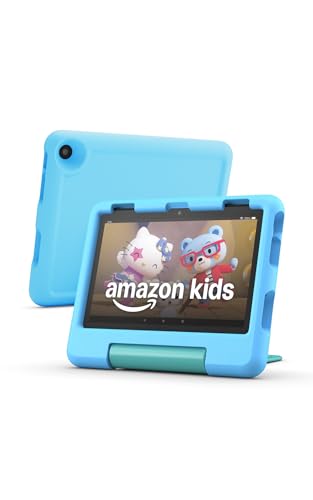
With up to 13 hours of battery life, this tablet can get through a full day of use without needing a recharge, handy for keeping kids entertained during travel or at home. The included kid-proof case with a stand and handle helps protect against drops, and the 2-year worry-free guarantee means a cracked screen is covered. Designed for children ages 3-7, it offers Amazon Kids+ content and parental controls to keep what they watch age-appropriate.
The Amazon Fire HD 8 Kids Tablet comes with a 2-year worry-free guarantee: if it breaks, Amazon replaces it for free. That alone makes it a low-risk buy for parents of young children. The included kid-proof case with a stand and handle protects against drops and bumps, and the screen uses strengthened aluminosilicate glass for extra durability.
Product photos
Vyrolinia Kids Android Tablet
What We Like
- Massive 1TB expandable storage
- Parental controls with time limits
- Shockproof silicone case included
- Long-lasting 6000mAh battery
Trade-offs
- Designed for kids, not rugged vehicle mounting
- No vehicle mounting hardware for car use
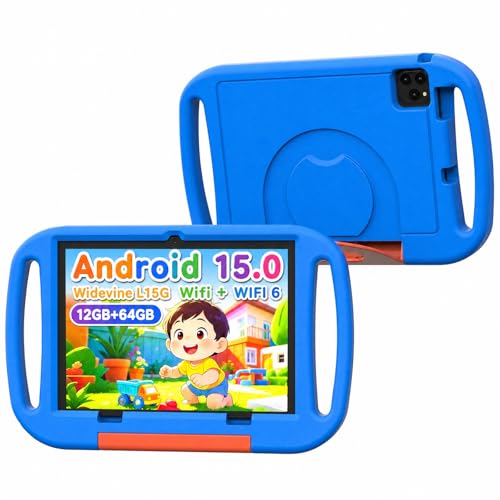
With 12GB RAM and 64GB of built-in storage expandable up to 1TB via TF card, the Vyrolinia Kids Android Tablet offers room for educational apps, videos, and games. It runs Android 15 with full Google Play access, so you can download apps and store offline content. The included shockproof silicone case with a kickstand helps protect the tablet during use, and the 6000mAh battery supports all-day light use like video watching or drawing apps. This makes it a practical choice for parents who want a dedicated tablet for children that doesn’t need frequent charging or storage management.
The real trade-off here is that this tablet is built for small hands and gentle indoor use, not for bolting onto a headrest or surviving a drop onto pavement at highway speeds. Compared to the Lehwey Portable Wireless Carplay Tablet, which is heavier at 2.5 pounds and includes a dash cam and backup camera, the Vyrolinia is lighter and lacks any vehicle-specific mounting hardware. If your main goal is a kid-friendly entertainment device with parental controls and expandable storage for travel, this works well. If you need a car tablet with navigation and camera features, look at the Lehwey instead.
Product photos
How We Evaluated Car Tablets
Our evaluation is research-based: we examined manufacturer specifications, documentation, and common patterns reported by owners for each model. We focused on the features that matter most when a tablet lives in a vehicle.
The first criterion was purpose-fit: does the tablet solve a specific in-car problem? Navigation tablets need GPS and bright screens, entertainment tablets need good speakers and mounting options, and rugged tablets need drop and water resistance. We also weighed power requirements, since some tablets need constant connection to a cigarette lighter while others have long-lasting batteries.
Screen quality in a car environment is critical. Key factors include resolution, brightness, and readability in direct sunlight. Storage and connectivity are also important: how much media can be loaded, and whether the device can connect to a phone hotspot or external devices like game consoles. This evaluation is based on a review of manufacturer claims and consistent owner reports.
What To Look For In Car Tablets
Choosing the right car tablet means matching the device to how you actually use your vehicle. Here are the key factors to consider before you buy.
Focus on mounting, power, screen brightness, and storage. A tablet that works for back-seat movies may fail as a navigation screen, and one built for field work may be too heavy for a headrest mount.
Mounting and Vehicle Fit
Not every tablet is designed to stay put in a moving car. Headrest monitors typically come with mounting brackets that secure the screen between the front seat headrest posts, while rugged tablets often use vehicle-specific cradles or universal RAM mounts. Consider your vehicle’s headrest design, some have fixed posts, others have removable or folding headrests. Weight matters here: a 3.1-pound tablet like the AGM PAD P2 may pull on a universal adhesive mount over time, while a lighter kids tablet may shift around without a proper bracket.
Power and Battery Life
Car tablets fall into two power categories: those with built-in batteries that you charge and use untethered, and those that require constant connection to the vehicle’s power source. Tablets with large batteries, like the 8000 mAh unit in the AGM PAD P2, can run for hours without draining your car battery. Others, like the Seventour 14-inch monitor, have no internal battery and must stay plugged into a USB port or cigarette lighter. If you plan to use the tablet during short trips or while parked, battery life becomes critical.
Screen Brightness and Sunlight Readability
- Check the brightness rating in NITs, higher numbers mean better visibility in direct sunlight.
- Consider screen resolution for watching video content at close range in the back seat.
- Look for anti-glare coatings or matte screens if the tablet will face a window.
- Test the viewing angle; some IPS screens wash out when viewed from the side.
A car tablet with a dim screen is almost unusable on a sunny day.
Car Tablets Compared
The table below compares all eight car tablets across the features that matter most for in-vehicle use.
| Product | Screen Size | Display Resolution | Storage |
|---|---|---|---|
| Lehwey Portable Wireless Carplay Tablet | 10.26 inches | 1600×600 | 64GB TF card |
| AGM PAD P2 Active Rugged Tablet | 11" | FHD | 16(8+8) + 256GB[TF 2TB] |
| Seventour 12.4" Android Car Headrest Monitor | 12.4" | 1920*1080 | 2GB RAM + 16GB ROM |
| NOAUKA 10.1" Android Car Headrest Tablet | 10.1 inches | 4K | 2GB RAM + 32GB |
| Seventour 14" Android Car Headrest Monitor | 14 inches | 2240×1400 | N/A |
| MobileDemand Flex 10D Rugged Tablet | 10.1" | 1920×1200 | 8GB LPDDR5 / 128GB NVMe SSD |
| Amazon Fire HD 8 Kids Tablet | 8" HD | HD | 64 GB |
| Vyrolinia Kids Android Tablet | 10 inch | N/A | 12GB RAM + 64GB ROM + 1TB expandable |
Frequently Asked Questions
Can I use a regular tablet in my car?
Yes, but you may need to buy a separate mount and a charger that stays plugged in. Regular tablets lack the rugged features, sunlight-readable screens, and dedicated mounting hardware that purpose-built car tablets offer.
What size car tablet is best for back-seat entertainment?
For back-seat use, a 10- to 12-inch screen works well for most vehicles. The Seventour 12.4-inch model fits between front headrests without blocking rear visibility, while the 14-inch version is better for larger SUVs and vans.
Do car tablets need internet to work?
Many car tablets use your phone’s hotspot for internet access. Some models, like the Lehwey Portable Wireless Carplay Tablet, connect wirelessly to your phone for navigation and calls without needing a separate data plan.
How do I mount a tablet in my car without damaging the interior?
Headrest-mounted brackets are the most common solution and do not damage seats. For dashboard mounting, use a suction cup mount designed for automotive use. Avoid adhesive pads on textured or leather surfaces.
Can I use a rugged tablet for everyday driving?
Yes, but rugged tablets like the AGM PAD P2 are heavier and bulkier than standard consumer tablets. They are best for off-road driving, work trucks, or anyone who frequently drops devices.
The Bottom Line
The Lehwey Portable Wireless Carplay Tablet is the best overall choice for most drivers because it combines navigation, entertainment, and a full dash-cam system in one device. If you need something tougher for off-road or work use, the AGM PAD P2 Active Rugged Tablet offers IP68 water resistance and drop protection that standard tablets cannot match.
For families, the Seventour 12.4-inch headrest monitor gives kids a large screen with wireless phone mirroring and HDMI input for game consoles. Parents of young children should look at the Amazon Fire HD 8 Kids Tablet for its sturdy case and replacement guarantee, while the Vyrolinia Kids Android Tablet offers expandable storage for long road trips.
The single most important factor is matching the tablet to your specific use case. A navigation tablet needs GPS and a bright screen, an entertainment tablet needs good mounting and battery life, and a work tablet needs rugged durability. Choose the one that fits how you actually drive.
