
9 Best Laptop Mounts For Trucks in 2026
This post contains affiliate links. As an Amazon Associate, we earn from qualifying purchases.
For field technicians and contractors who need a reliable workstation on the road, the MELIPRON No-Drill Truck Laptop Mount is the best overall choice. It earns that spot with dual USB cooling fans, a quick-release pole, and a rugged 2-year warranty. The RAM MOUNTS Universal No-Drill Laptop Mount offers excellent vibration damping for drivers who swap vehicles, while the SPIRRELAB No-Drill Ford Truck Laptop Mount brings dedicated cooling for Ford F-Series owners.
The real challenge with truck laptop mounts is finding one that stays stable on rough roads, installs without drilling into your vehicle’s floor, and keeps your laptop cool during long workdays. A mount that wobbles or overheats your equipment can ruin a job site report or delay a service call.
We evaluated these nine mounts by digging into manufacturer specs, expert round-ups, and patterns in owner feedback. This guide walks you through the key features that matter, installation type, cooling, stability, and adjustability, so you can pick the right mount for your truck and your workflow.
Top 9 Laptop Mounts For Trucks in the Market
Certain content that appears on this site comes from Amazon. This content is provided "as is" and is subject to change or removal at any time.
The Best Laptop Mounts For Trucks, Reviewed
MELIPRON No-Drill Truck Laptop Mount

What We Like
- Dual USB cooling fans prevent overheating
- No-drill installation preserves vehicle structure
- Quick-release pole preserves 80% passenger space
- 2-year warranty with free replacement parts
Trade-offs
- At 12 pounds, heavier than some alternatives
- Passenger seat must be compatible with rail bolts
- Fans require USB power to operate
A 12-pound aluminum-and-steel frame with dual USB cooling fans means this mount stays stable on rough roads while actively preventing your laptop from overheating during long shifts. The no-drill installation bolts directly to passenger seat rails, so you can set it up in a fleet truck or personal vehicle without drilling holes or risking leaks. It also preserves 80% of passenger space thanks to a quick-release telescopic pole that lets you remove the stand entirely when you need the seat. This mount is built for technicians and contractors who spend hours in the truck and need a sturdy, cool-running workstation that doesn’t permanently alter the vehicle.
At 12 pounds, this mount is built to stay put on rough roads, but its weight means you’ll probably want to leave it in one vehicle. The heavy-duty aluminum and steel construction keeps a laptop stable over bumps, and the built-in dual USB cooling fans help prevent overheating during long work sessions. You get a full 360-degree swivel and adjustable height and tilt for a comfortable viewing angle, all without drilling into your vehicle’s seat rails.
Product photos
RAM MOUNTS Universal No-Drill Laptop Mount

What We Like
- No-drill seat bolt installation
- Patented ball and socket vibration damping
- Dual articulating swing arm adjustment
- Universal base fits many vehicles
Trade-offs
- No cooling fans for laptop heat
- Dual swing arms can loosen over time requiring retightening
The patented ball and socket mounting system absorbs shock and vibration from rough roads, so your laptop screen stays readable and your hard drive gets less jarring. That dual swing arm gives you simple, tool-free adjustment to position the tray exactly where you need it, parked or moving. For anyone who wants a sturdy workstation without drilling holes in their truck cab, this is the route to take. The universal base bolts into existing passenger seat bolts, so it works across a wide range of vehicles, and the Tough-Tray holds laptops from 10 to 16 inches securely.
The RAM MOUNTS Universal No-Drill Laptop Mount installs using existing passenger seat bolts, so you get a secure workstation without drilling or permanent modifications to your vehicle. The patented ball and socket system dampens shock and vibration, which keeps your laptop steady on rough roads. Dual articulating swing arms let you adjust the screen to the most comfortable viewing angle with minimal effort. Backed by a lifetime warranty, the mount is designed for years of daily use in trucks, cars, and fleet vehicles.
Product photos
RAM MOUNTS Ford F-150 No-Drill Laptop Mount

What We Like
- No-drill install using existing seat bolts
- Dual articulating swing arm for flexible placement
- Fits 2015-2026 Ford F-150 and Super Duty trucks
- Lifetime warranty on construction
Trade-offs
- At 13.2 pounds, it is heavier than some alternatives
- Only fits Ford F-150 and Super Duty models (2015+)
- Passenger-side install only, limits driver access
A dual articulating swing arm and a Tough-Tray that holds 10-to-16-inch laptops mean you can position your screen exactly where you need it without fighting a fixed mount. It is built from powder-coated steel and marine-grade aluminum, which handles the bumps and vibration of a work truck without feeling flimsy.
The trade-off is weight and specialization. At 13.2 pounds, this mount is heavier than some alternatives, which means it adds more permanent mass to your cab and takes a bit more effort to install or remove. It is designed for Ford trucks from the years listed, so if you drive a different brand or an older model, you will need a different option. But if you own one of those compatible Fords and want a no-drill setup backed by a lifetime warranty, this mount is built for that use.
SPIRRELAB No-Drill Ford Truck Laptop Mount

What We Like
- Two built-in cooling fans prevent overheating
- No-drill installation with included video guides
- 5-clamp system reduces wobble on rough roads
- Quick-release telescopic pole frees passenger space
Trade-offs
- Fits only Ford F-Series trucks (2015-2026)
- No height adjustment beyond telescopic pole range
Two built-in cooling fans make this mount stand apart for anyone who runs demanding software or leaves a laptop running in a hot cab. The fans are built into the tray to help prevent overheating. The 5-clamp system plus a securing strap keep the device planted even on rough roads. For Ford F-Series owners who work out of their truck and rely on their laptop staying cool and steady, this is a purpose-built solution that doesn’t cut corners on the basics.
You’re locked into Ford trucks from 2015 onward, no Chevy, Ram, or older models. The 20.5-inch height may feel tall in a smaller cab compared to some other mounts.
Product photos
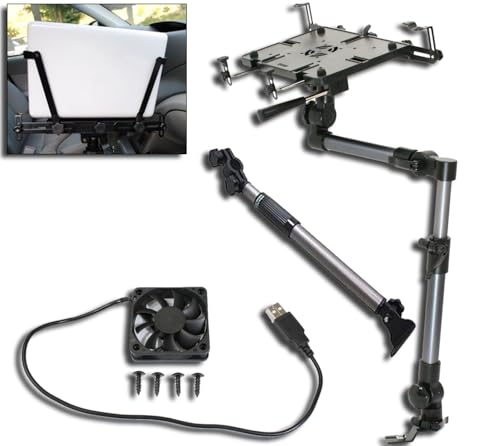
Mobotron MS-526B Heavy Duty Laptop Mount
What We Like
- Includes support brace for extra stiffness
- USB cooling fan preinstalled in deck
- Screen stabilizers hold screen in place
- Fits laptops 6" to 17" and tablets
Trade-offs
- At 8.6 lb, heavier than some competitors
- Requires flat, accessible seat rail bolt
The included accessory bundle, a support brace, a pair of screen stabilizers, and a USB-powered cooling fan preinstalled in the mounting deck, means you get everything in one box. The support brace increases the mount’s stiffness, and the cooling fan is ready to use. For someone who wants a setup without buying extra parts, this bundle covers the basics.
Weight is a factor: at 8.6 pounds, the Mobotron is heavier than the Mount-It! Car Laptop Mount for Truck (7.1 lb), so it adds more weight to your vehicle. Installation is still quick, under 10 minutes with no drilling, but only if your passenger seat rail is flat and the bolt is easy to reach. That makes it a better fit for vehicles with straightforward seat rail access.
VIVO Adjustable Laptop Car Mount

What We Like
- Wide 9" vertical arm adjustment
- Quick disconnect for passenger seat
- Ventilated tray for cooling
Trade-offs
- Requires exposed floor seat bolts
- 11 lb weight adds to vehicle load
- Only passenger side mounting
The ventilated tray and quick-disconnect thumb screws make it practical for drivers who need a stable workstation that can vanish when the passenger seat is needed again. It suits anyone who values ergonomic fit over sheer simplicity, especially if you share the vehicle or swap drivers often.
This mount anchors to exposed floor seat bolts on the passenger side, with mounting feet that work at 0°, 90°, and 45° angles. It weighs 11 pounds. The arm offers tilt, swivel, rotation, and height adjustment, so you can dial in a comfortable viewing angle. For buyers who want lots of adjustability and don’t mind a bolt-on install, this is a flexible option.
Mount-It! Car Laptop Mount For Truck

What We Like
- Active and passive cooling combined
- Folds away for passenger seat use
- No-drill installation with three bracket options
Trade-offs
- 6.6 lb limit rules out heavy laptops
- Requires checking seat bolt compatibility before buying
- Fan needs USB power for active cooling
The stabilizer arm built into this mount is what sets it apart. While many truck laptop mounts let the tray bounce and sway over rough roads, this model uses toothed locking segments on the pole to hold each height position exactly where you set it. That means your laptop stays put when you’re typing up reports between job sites or following GPS directions on a bumpy two-lane. The arm swivels a full 360°, and the height adjusts from 14 to 22.25 inches, so you can position the screen where you need it. A ventilated tray plus a USB-powered fan both move heat away from your laptop during long parked sessions. For field techs, inspectors, and contractors who need a steady workstation on the move, this mount is designed to reduce wobble.
The 6.6-pound weight limit is worth noting. That’s fine for most everyday laptops and tablets up to 17 inches, but if you run a heavy-duty workstation laptop or a ruggedized unit, you’ll need to weigh your device before buying. The no-drill installation is flexible: you can use a horizontal bracket, a vertical bracket, or bolt directly to the seat bolt hole, but you do have to check your vehicle’s seat bolt pattern first. Compared to the MELIPRON No-Drill Truck Laptop Mount, which has a 12-pound weight capacity, the Mount-It! is designed for smaller loads. If your laptop is under that 6.6 lb ceiling and you value a stable screen over sheer carrying power, this mount fits the bill.
Product photos
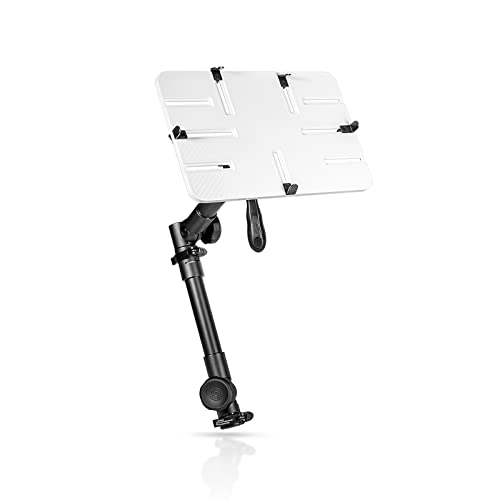
AA-Products T-100AP Aluminum Vehicle Mount
What We Like
- Telescopic height adjusts 24-36 inches
- Full 360° swivel and 180° tilt
- No-drill seat-bolt installation
- Extendable brackets for secure laptop fit
Trade-offs
- Fits only laptops 10-13 inches
- ABS plastic tray less rigid than metal
- Seat-bolt mount limits passenger legroom
The no-drill seat-bolt install keeps the floor clean. The ABS plastic tray with extendable brackets holds 10- to 13-inch laptops securely, while the 360-degree swivel and 180-degree tilt let you angle the screen toward the driver or a front-seat passenger.
The tray size limits this mount: it only fits laptops up to 13 inches, so if you run a 15-inch work machine, you will need to look at other models that accept larger laptops. The ABS plastic tray is solid and durable per the manufacturer, though some buyers may prefer a metal tray for a different feel. For anyone with a compact laptop who needs a wide height range and no-drill installation, this mount delivers reach that suits many seat-bolt setups.
Product photos
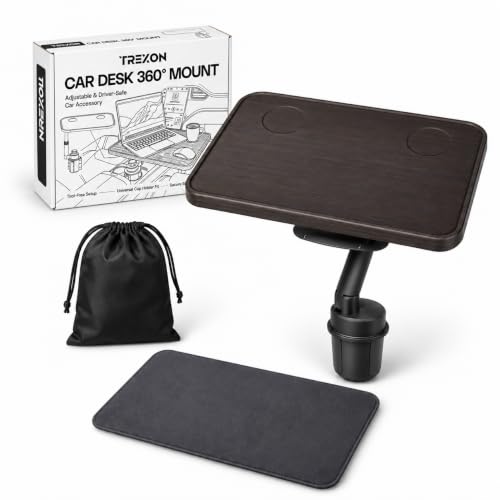
TREXON Cup Holder Laptop Desk
What We Like
- Tool-free cup holder installation
- 360 swivel and adjustable height
- Spacious work surface with cup recesses
- Includes non-slip mat and storage bag
Trade-offs
- Only fits cup holders 2.6-3.3 inches
- No cooling fans for laptop heat
A spacious work surface holds a laptop, tablet, or a full meal, with two built-in cup recesses that keep drinks steady. The mount installs without tools by dropping into any standard cup holder between 2.6 and 3.3 inches. That means you can set it up in seconds and rotate the tray 360 degrees toward the driver or passenger. The telescoping pole lets you find a comfortable height, which cuts down on neck strain during long drives or lunch breaks. It suits anyone who wants a portable, lightweight desk that stows in the included bag and works in most cars, trucks, or SUVs.
This mount relies on a cup-holder base, which may not be as stable as a floor-mounted or seat-bolt design for heavy-duty use. It also lacks cooling fans, so if you run demanding software for extended periods, consider a mount with active cooling. For everyday typing, eating, or light work, this cup-holder desk offers quick setup and easy portability.
Product photos
How We Evaluated Laptop Mounts For Trucks
Our research began with a close look at each mount’s specifications and manufacturer documentation, then expanded to expert round-ups and patterns in owner feedback from drivers who use these mounts daily. We focused on four criteria that matter most when your truck is your office: installation method, cooling capability, stability on uneven terrain, and adjustability.
Installation method was the first filter. No-drill mounts that use existing seat bolts preserve your truck’s resale value and avoid the hassle of drilling into the floor. We gave preference to mounts that include clear instructions or video guides and fit a wide range of vehicle models.
Cooling and stability came next. A laptop that overheats on a hot dashboard or shakes loose on a gravel road is a productivity killer. We looked for mounts with active cooling fans, vibration-damping materials, and sturdy tray designs that minimize wobble. Weight capacity and tray material also factored into our assessment of long-term durability.
Finally, we considered adjustability and passenger-space impact. A mount that blocks the passenger seat or can’t tilt to reduce glare isn’t practical for all-day use. We evaluated height range, swivel and tilt options, and how easily the mount can be moved aside when a passenger needs the seat. This research-led approach helps you narrow down the options without needing to test each one yourself.
What To Look For In Laptop Mounts For Trucks
Choosing the right mount starts with understanding your truck’s interior and your daily work demands. The three factors below will guide you to a setup that stays put, keeps your gear cool, and fits your vehicle without permanent modifications.
Focus on no-drill installation for vehicle preservation, active cooling for long work sessions, and a weight capacity that supports your laptop model. A stable mount with good adjustability makes the difference between a frustrating and a productive mobile office.
Installation Method: No-Drill vs. Drilling
Most truck laptop mounts attach using existing seat bolts, which means no holes in your floor or center console. No-drill installation preserves your vehicle’s resale value and avoids the risk of drilling into a fuel line or wiring harness. Look for mounts that include the necessary brackets and hardware for your specific truck model. Some universal mounts work across many vehicles, while others are designed exclusively for Ford F-Series or RAM trucks.
Cooling: Active Fans vs. Passive Ventilation
Laptops generate significant heat, especially when running diagnostic software, GPS mapping, or video calls in direct sunlight. Mounts with built-in USB cooling fans actively pull heat away from the underside of your laptop, preventing thermal throttling and potential damage. Passive cooling relies on a ventilated tray and your laptop’s own fans. If you work in hot climates or run demanding applications, active cooling is a worthwhile investment.
Stability and Weight Capacity
A mount that wobbles on rough roads makes typing and reading difficult. Look for reinforced trays, support braces, and vibration-damping materials like RAM MOUNTS’ patented ball-and-socket system. Check the mount’s weight limit against your laptop’s weight, heavy-duty ruggedized laptops can exceed 6 pounds, which rules out lighter-duty mounts. A stable base and secure clamping system keep your equipment safe.
- Measure your seat bolt spacing before buying, some mounts require specific rail configurations.
- Check that the mount’s tray fits your laptop’s width, especially if you use a 17-inch model.
- Consider how the mount affects passenger legroom and whether it can be quickly removed.
A good rule of thumb: buy the mount that matches your laptop’s weight and your truck’s bolt pattern, then prioritize cooling if you work in warm conditions.
Laptop Mounts For Trucks Compared
The table below compares all nine laptop mounts side by side, highlighting their key specs and best-use scenarios so you can see at a glance which one fits your truck and workflow.
| Product | Mount Type | Laptop Size | Weight |
|---|---|---|---|
| MELIPRON No-Drill Truck Laptop Mount | Seat rail bolts | N/A | 12.0 Pounds |
| RAM MOUNTS Universal No-Drill Laptop Mount | Seat bolt, no-drill | 10"–16" | N/A |
| RAM MOUNTS Ford F-150 No-Drill Laptop Mount | No-drill, uses existing seat bolts | 10" to 16" | 13.2 pounds |
| SPIRRELAB No-Drill Ford Truck Laptop Mount | No-drill, 3-point support base | N/A | N/A |
| Mobotron MS-526B Heavy Duty Laptop Mount | No drilling | 6" to 17" | 8.6 Pounds |
| VIVO Adjustable Laptop Car Mount | Seat bolt (0°, 90°, 45°) | up to 17" | 11.0 pounds |
| Mount-It! Car Laptop Mount For Truck | No-Drill | 17 inches | 7.1 pounds |
| AA-Products T-100AP Aluminum Vehicle Mount | Passenger seat-bolt, no drilling | 10 to 13 inches | N/A |
| TREXON Cup Holder Laptop Desk | Cup holder (2.6-3.3 in) | N/A | 4.4 lb |
Frequently Asked Questions
Can I install a laptop mount without drilling holes in my truck?
Yes, most truck laptop mounts use a no-drill installation that attaches to existing seat bolts under the passenger seat. This method is reversible and does not damage your vehicle’s floor or interior. Always check the mount’s compatibility with your specific truck model before purchasing.
Do laptop mounts block the passenger seat completely?
Some mounts take up the entire passenger footwell, while others feature a quick-release pole or telescopic design that frees up space when not in use. The MELIPRON and SPIRRELAB mounts both include a quick-release mechanism that preserves roughly 80 percent of passenger legroom.
How do cooling fans in laptop mounts work?
Cooling fans are built into the mount’s tray and connect via USB to your laptop, a power bank, or a vehicle USB port. They draw heat away from the laptop’s underside, helping prevent overheating during long work sessions in warm weather. Not all mounts include fans, so check the product description if active cooling is important to you.
What is the best laptop mount for a Ford F-150?
The RAM MOUNTS Ford F-150 No-Drill Laptop Mount is designed specifically for 2015 and newer F-150 and Super Duty models, with a lifetime warranty on construction. For drivers who also want active cooling, the SPIRRELAB No-Drill Ford Truck Laptop Mount includes two built-in fans and a 5-clamp system for stability.
Can I use a laptop mount with a tablet or a 17-inch laptop?
Several mounts accommodate both laptops and tablets. The Mobotron MS-526B fits devices from 6 to 17 inches and includes screen stabilizers. The AA-Products T-100AP is limited to 10-13 inch laptops, so always check the tray width and weight capacity before buying.
The Bottom Line
For most technicians and contractors, the MELIPRON No-Drill Truck Laptop Mount delivers the best combination of active cooling, sturdy construction, and passenger-space preservation. Its dual USB fans and no-drill installation make it a reliable daily driver for rough-road work. If you drive a Ford F-150 or Super Duty and want a lifetime warranty, the RAM MOUNTS Ford-specific mount is a solid alternative.
Budget-conscious buyers or those who swap vehicles frequently should consider the RAM MOUNTS Universal No-Drill Laptop Mount for its excellent vibration damping and universal fit. Drivers who need maximum height range for a smaller laptop will appreciate the AA-Products T-100AP‘s 24-36 inch telescopic adjustment.
The single most important factor when choosing a truck laptop mount is finding one that bolts securely to your existing seat rails without drilling. Get that right, and you’ve built a stable foundation for a productive mobile office.
