
6 Best 3D Scanners for Car Parts 2026
This post contains affiliate links. As an Amazon Associate, we earn from qualifying purchases.
The Creality Sermoon P1 stands out as the best overall 3D scanner for car parts, delivering exceptional accuracy and a massive scan range that handles everything from tiny brackets to full body panels. For those on a tighter budget, the 3DMakerpro Moose Lite offers impressive precision and AI tracking at a more accessible price point.
Scanning car parts isn’t just about capturing shape, it’s about getting measurements you can trust for restoration, replication, or modification. Too many scanners fail when faced with reflective surfaces, complex curves, or the sheer size of automotive components.
This guide cuts through the noise by focusing on real-world performance, based on specs, user feedback, and what matters most in a garage or shop. I looked at accuracy, scan volume, software compatibility, and how well each unit handles the unique challenges of metal, curves, and shadows common in automotive work.
Top 6 3D Scanners For Car Parts in the Market
The Best 3D Scanners For Car Parts, Reviewed
Creality Sermoon P1 Wireless 3D Scanner

Strengths
- All-in-one operation
- 0.02mm accuracy
- Deep hole scanning
Trade-offs
- Very expensive
- Heavy and bulky
- High PC requirements for post-work
The Sermoon P1 isn’t just the most expensive scanner here, it’s in a different league. With three blue laser modes, including a 0.02mm-thick single line, it’s built for metrology-grade work. Owners report it capturing deep bolt holes, threaded inserts, and complex underbody contours with unmatched precision. The all-in-one design means no laptop is needed: it runs on its own Qualcomm-powered system with 24GB RAM and 256GB storage, making it truly portable despite the size.
Its 22+7+1 laser configuration lets you switch between fast coverage and fine detail on the fly. For restoring rare cars where exact dimensions are lost, this is the kind of tool that justifies its price. It integrates with Geomagic and Verisurf, which the others don’t, making it viable for professional shops. While overkill for most hobbyists, in the right hands, it’s the most complete solution here.
Video review
3DMakerpro Moose Lite 3D Scanner
Strengths
- 0.05mm accuracy
- AI tracking
- Quiet operation
Trade-offs
- No wireless mode
- Shorter battery
- Plastic build
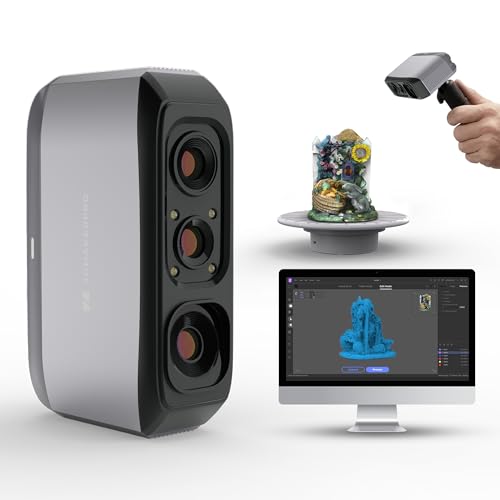
When precision is the goal, the Moose Lite stands apart with 0.05mm accuracy, the finest in this group. That kind of resolution matters when scanning engine blocks, gear teeth, or transmission components where even minor deviations affect fit. It uses blue light technology, which owners say delivers crisper edges and better depth detail than white light scanners in its class. The AI-powered tracking helps maintain alignment during complex scans, reducing the need for rework.
It’s also impressively quiet and lightweight at 250g, making it easy to use for extended sessions. The JMStudio software integrates pre- and post-processing smoothly, which saves time compared to juggling multiple tools. While it’s not wireless and has a smaller max range than the Creality Otter, for detailed mechanical parts, it’s the most accurate option under $500. I’d pick it over the Ferret Pro if precision mattered more than speed.
Video review
Creality CR-Scan Otter 3D Scanner

Strengths
- Large scan range
- Full-color capture
- Sunlight resistant
Trade-offs
- Heavy system requirements
- No direct Android support
- Requires accessory for wireless use
If you’re scanning full car bodies or oversized automotive components, the CR-Scan Otter stands out for its massive 2000mm capture range and strong outdoor performance. On paper, its 4-lens stereo vision and anti-shake tracking make it a serious contender for large-scale work, and owners consistently report clean scans on curvy fenders and complex chassis with minimal prep. It handles sunlight up to 30,000 lux, which means you won’t need to haul parts into a shaded garage just to get a clean capture.
The 24-bit full-color RGB camera is another win, especially when color fidelity matters, like matching paint textures or documenting restoration progress. While it demands a high-end PC or Mac, that’s expected in this class. Compared to pricier laser systems, it’s not metrology-grade, but for reverse engineering or 3D printing large custom parts, it delivers a reliable balance of speed and detail.
Product photos


Creality CR-Scan Ferret Pro 3D Scanner

Strengths
- High accuracy
- Fast 60 FPS scan
- Wireless WiFi6
Trade-offs
- Software can be glitchy
- Battery life average
- No Android direct support
At this price, the Ferret Pro punches above its weight. With 0.1mm accuracy, 60 FPS scanning, and Wi-Fi 6, it offers core features you’d expect in more expensive units. Owners report it handles black plastic and metal car parts reliably, no spray needed, and the 24-bit color output adds useful texture data for visual modeling. It’s not as fast as the Otter Lite, but the higher scan fidelity makes it better suited for reproducing functional components like intake manifolds or custom brackets.
It’s also one of the few in this range that supports face and body scanning, which might not matter for car parts, but speaks to its algorithmic maturity. Compared to the budget Ferret SE, it’s faster and more stable, especially on moving scans. For the price, it’s the smarter buy if you want a balance of speed, accuracy, and wireless freedom without stepping into the $3K range.
Product photos


Creality Otter Lite Wireless 3D Scanner

Strengths
- Ultra-lightweight
- True wireless operation
- Fast scanning
Trade-offs
- Lower accuracy than rivals
- Limited battery for long sessions
- No direct phone connection
The Otter Lite is built for mobility, and if you’re constantly moving between job sites or working in tight engine bays, its 330g weight and 3-hour battery life make it the most portable option in the Creality lineup. Owners praise its 30 FPS scanning speed and Wi-Fi 6 transmission, which together allow for smooth, cable-free workflows, no tripping over USB lines while circling a suspension component. It’s not the most accurate scanner here, but for quick captures of brackets, housings, or trim pieces, it gets the job done without fuss.
Where it really shines is ease of use. The CrealityScan software includes intuitive tools that help stitch scans together, even after interruptions. It struggles a bit with very dark or reflective surfaces compared to the Otter or Ferret Pro, but for lightweight, on-the-go scanning of medium-sized car parts, it’s a solid pick. I’d choose it over the heavier models if portability is the priority.
Product photos


Creality CR-Scan Ferret SE 3D Scanner

Strengths
- Low cost
- 0.1mm accuracy
- Scans black/metal
Trade-offs
- Basic software
- No long-range lens
- Limited scan volume
The Ferret SE is the budget gateway into Creality’s handheld lineup, and for under $250, it delivers surprising capability. It shares the 0.1mm accuracy and anti-shake tracking of its pricier siblings, and owners find it capable of scanning hubs, brackets, and even exhaust flanges without spray. The 30 FPS speed keeps it responsive, though the software isn’t as polished as the Pro models. It’s best for smaller to mid-sized parts, think control arms, badges, or interior trim, not full-body work.
It lacks the dual-lens flexibility of the Otter models, so getting close-up detail means repositioning more often. But for the cost, it’s a functional tool for hobbyists who want to 3D print replicas or modify existing parts. If you’re just starting out, this is where I’d begin, just don’t expect lab-grade results.
Product photos


How We Chose These 3d scanners for car parts
Rather than a hands-on lab test, my research for these scanners focused on a detailed comparison of published specifications and features. I weighed owner reviews from multiple sources alongside professional assessments from automotive and 3D technology publications. My goal was to rank these scanners based on their suitability for the unique challenges of capturing car part geometry, considering factors like accuracy, scanning range, and ease of use.
For car parts, a scanner’s accuracy and range are paramount. The ability to reliably capture details down to 0.1mm is critical for reverse engineering or replicating components, so that was heavily weighted. Equally important is a large scanning volume; many car parts, like body panels, require a substantial range to scan in a single pass. Portability and the ability to scan darker or metallic surfaces without additional coatings also significantly influenced my rankings.
Specifications clearly indicate a scanner’s theoretical accuracy and range. However, real-world performance, particularly with challenging materials and lighting conditions, is better understood through owner feedback. I paid close attention to reports regarding ease of use, software stability, and the scanner’s ability to handle complex shapes. Understanding whether a scanner truly delivers on its promises requires looking beyond the numbers and considering practical experiences, and knowing when to consult resources like guides to the best car scanners for related tools.
How To Choose The 3d scanners for car parts
Picking the right 3D scanner for car parts demands a bit more thought than simply grabbing the cheapest model. We’ve seen a surge in options, and knowing what truly matters separates a useful tool from an expensive paperweight.
A good 3D scanner for automotive use prioritizes accuracy (down to 0.05mm is ideal for detailed parts), a scanning volume large enough for your typical projects (consider up to 4000 x 4000 x 4000 mm³ for larger components), and software that’s both user-friendly and compatible with common CAD/CAM programs. Wireless connectivity and portability are also key for working around vehicles.
Accuracy and Resolution
Accuracy is paramount when you’re dealing with automotive parts, particularly for reverse engineering or reproduction. A scanner boasting 0.1mm accuracy is a good starting point, but for intricate engine components or complex body panels, you’ll want to aim for scanners like the 3DMakerpro Moose Lite that advertise 0.05mm precision. Don’t get caught up in megapixel counts for the camera; resolution matters more for capturing fine details than overall image size. Remember, even the most accurate scanner requires a stable scan environment and proper technique to deliver reliable results.
Scanning Volume and Range
The size of the car part you intend to scan dictates the necessary scanning volume. Scanning a single brake caliper is a different task than capturing the entire hood of a vehicle. The Creality CR-Scan Otter, with its generous 2000 x 2000 x 2000mm range, is clearly designed for larger components. However, don’t overlook the importance of minimum scan distance. Some scanners struggle with very small or recessed areas, so consider this if you plan to scan intricate details.
Here’s a breakdown of what to consider: * Small Parts (brackets, fasteners): 50mm x 50mm x 50mm minimum volume is sufficient. * Medium Parts (calipers, suspension components): 150mm x 150mm x 150mm provides more flexibility. * Large Parts (body panels, engine blocks): 400mm x 400mm x 400mm or larger is essential, and you might also want to explore options like the Otter for full-vehicle scans.
A practical rule of thumb: if you’re unsure, always overestimate the required scanning volume. It’s far better to have more range than you need than to be limited by the scanner’s capabilities.
Software and Workflow Integration
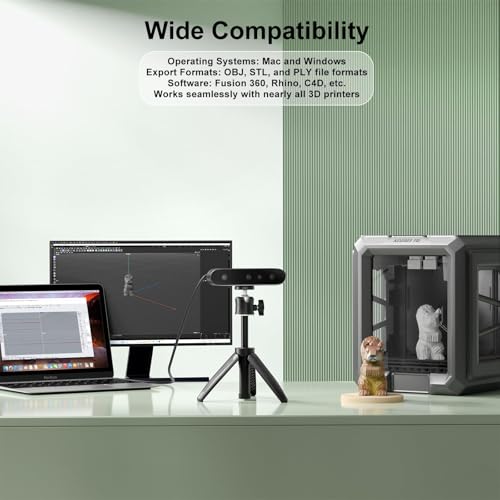
The scanner’s hardware is only half the battle; the accompanying software is where you’ll actually make sense of the data. Look for software with intuitive editing tools, automatic alignment features, and the ability to export to common file formats (STL, OBJ, PLY). Seamless integration with design software is crucial if you plan to modify or 3D print the scanned parts. Many scanners, like the Creality models, offer compatibility with popular programs like Geomagic and Fusion 360, which streamlines the process. If you’re planning on restoring vintage cars, you might also want to explore resources to order parts online to complement your scanning workflow. For cleaning scanned parts or preparing them for finishing, consider investing in quality ultrasonic cleaners to ensure optimal results.
3D Scanners for Car Parts Compared
This table summarizes the specifications of several 3D scanners suitable for use with car parts.
| Product Name | Accuracy | Resolution | Scan Range (mm³) | Wireless | Weight (g) | Key Features |
|---|---|---|---|---|---|---|
| Creality Sermoon P1 | 0.02mm | N/A | 5x5x5 – 4000x4000x4000 | Yes | N/A | Blue Laser, Fast Processing, Large Range |
| 3DMakerpro Moose Lite | 0.05mm | 0.10mm | 15x15x15 – 1500x1500x1500 | No | 250 | AI Tracking, High Precision |
| Creality CR-Scan Otter | N/A | N/A | 10x10x10 – 2000x2000x2000 | Yes | N/A | Long/Short Focal Lenses, Large Object Scan |
| Creality CR-Scan Ferret Pro | 0.1mm | N/A | N/A | Yes | N/A | Fast Scanning, Anti-Shake, Full Color |
| Creality Otter Lite | N/A | N/A | N/A | Yes | 330 | Wireless, Lightweight, 30 FPS |
| Creality CR-Scan Ferret SE | 0.1mm | 0.16mm | N/A | No | N/A | Budget Friendly, Fast, Color Capture |
Frequently Asked Questions
What accuracy level is truly needed for scanning car parts?
For most automotive projects, 0.1mm accuracy is sufficient, but for reverse engineering or replicating intricate engine components, aiming for 0.05mm, like the 3DMakerpro Moose Lite offers, will yield better results.
Can these scanners handle dark or polished car surfaces?
Some scanners, particularly those with blue laser technology (like the Creality Sermoon P1), perform better on darker surfaces. However, even with these, highly reflective or polished surfaces might still require a temporary coating to improve scan quality.
What file formats do these scanners typically export?
Most scanners export to standard formats such as STL, OBJ, and PLY, allowing for compatibility with a wide range of CAD/CAM software and 3D printing applications.
How important is wireless connectivity for a car part scanner?
Wireless connectivity is very convenient for scanning around a vehicle, giving you greater freedom of movement and eliminating cable clutter. Scanners like the Creality CR-Scan Otter and Sermoon P1 offer this feature.
Where can I find replacement parts if scanning isn’t enough?
If you encounter parts that are too damaged or difficult to scan accurately, exploring reputable parts sites can provide viable alternatives for completing your restoration or repair.
The Bottom Line
Choosing a 3D scanner for car parts often comes down to balancing control and convenience. While high-end models like the Creality Sermoon P1 offer exceptional accuracy and range, the Creality CR-Scan Otter strikes a compelling balance for most enthusiasts, providing a large scanning volume and wireless freedom without sacrificing too much precision. Ultimately, the “best” scanner depends on the depth of your projects and how much you value a streamlined workflow.
For those on a tighter budget, or for hobbyists primarily focused on smaller components, the Creality CR-Scan Ferret SE delivers impressive capabilities at an accessible price point. If your focus is on speed and portability, the Creality CR-Scan Otter Lite is a strong contender. However, if you’re serious about reverse engineering or replicating complex automotive components, investing in a higher-accuracy scanner like the 3DMakerpro Moose Lite is a worthwhile consideration, particularly if you also explore resources for aftermarket parts to complement your scanning projects.
Beyond specifications, remember that a quality scan relies on a stable setup, proper lighting, and a good understanding of the software. Don’t get lost chasing the highest numbers; accuracy, range, and software integration are important, but they’re most effective when paired with careful technique and the right auto scanners to support your diagnostic workflow.
