
9 Best Car Laptop Mounts in 2026
This post contains affiliate links. As an Amazon Associate, we earn from qualifying purchases.
For mobile workers who need a reliable workstation on the road, the MELIPRON No-Drill Truck Laptop Mount stands out as the best overall pick. It uses a no-drill seat rail installation and includes dual USB cooling fans. For those needing full articulation, the VIVO Adjustable Single Laptop Car Mount offers a secure bolt-down design. The SPIRRELAB No-Drill Car Laptop Mount provides exceptional stability with its triangular base.
The real challenge with car laptop mounts isn’t finding one that fits, it’s finding one that stays put on rough roads, doesn’t overheat your computer, and still lets you use the passenger seat when needed. A mount that wobbles or blocks cabin space can be more distracting than helpful.
This guide is based on a thorough review of specifications, manufacturer documentation, and patterns in owner feedback. We focused on the features that matter most for daily field use: stability, cooling, adjustability, and ease of installation. Here are the nine best options for turning your vehicle into a productive mobile office.
Top 9 Car Laptop Mounts in the Market
Certain content that appears on this site comes from Amazon. This content is provided "as is" and is subject to change or removal at any time.
The Best Car Laptop Mounts, Reviewed
MELIPRON No-Drill Truck Laptop Mount

What We Like
- No-drill seat rail installation
- Dual USB cooling fans prevent overheating
- 360° swivel and height adjustable
- Quick-release pole preserves passenger space
Trade-offs
- At 12.0 lb, adds noticeable weight to seat
- Telescopic pole requires removal to free full passenger seat
A 12.0-pound steel-and-aluminum frame bolts directly to your passenger seat rails without drilling. That is the kind of sturdy foundation you want when your laptop is bouncing down a rough job site road. The dual USB cooling fans help prevent your laptop from overheating during long hours of use, and the 360° swivel lets you tilt the screen exactly where you need it, which helps reduce neck, shoulder, and wrist strain. This mount is built for technicians and contractors who treat their vehicle like a mobile office and need something that won’t wobble loose on a gravel access road.
The trade-off for that heavy-duty stability is weight: at twelve pounds, it’s heavier than some other mounts in this guide. While the quick-release telescopic pole lets you reclaim most of the passenger space when you’re not working, you’ll still need to stow the base. Compared to the Mount-It! Car Laptop Mount with Stabilizer, which weighs about five pounds less, the MELIPRON feels more planted on rough terrain but demands more effort to remove between shifts. If your work day involves constant in-and-out of the truck, the extra heft may slow you down, but if you want a mount that stays put when the road gets rough, this is the one.
Product photos
VIVO Adjustable Single Laptop Car Mount

What We Like
- Quick-disconnect for passenger seat
- Ventilated tray for laptop cooling
- Holds up to 17" laptops
Trade-offs
- Requires exposed floor seat bolts
- Total product weight is 11.0 pounds
The telescopic pole adjusts from 18.5 to 26.3 inches, and the arm bracket slides along a 9-inch range, so you can dial in exactly the right height and reach.
This mount only fits vehicles with exposed floor seat bolts, but it includes three mounting feet for 0-, 45-, and 90-degree angles, giving broad compatibility with cars, trucks, and SUVs. Compared to the MELIPRON No-Drill Truck Laptop Mount, which requires no drilling, the VIVO needs those exposed bolts to install. Once bolted down, the quick-disconnect mechanism lets you remove the stand by taking out the thumb screws, returning the seat to a functional passenger area.
SPIRRELAB No-Drill Car Laptop Mount

What We Like
- Triangular 3-point base limits movement
- Dual USB cooling fans reduce heat
- Detachable upper workstation for passenger space
- 5 adjustable clamps with 59" strap
Trade-offs
- At 12.3 lb, heavy for frequent removal
- Requires passenger-seat bolt fitment check
A triangular 3-point base helps limit mount movement when parked, so you get a stable platform for running diagnostics or field reports without drilling into the vehicle. Five adjustable clamps and a 59-inch strap hold laptops from 9 to 17 inches, and the dip-coated contact points add grip while reducing scratches on your device. Dual USB cooling fans increase airflow to help reduce heat buildup during extended work sessions in a hot cab. This mount is built for anyone who needs a no-drill setup that stays planted while parked.
At 12.3 pounds, this mount is heavier than the 7.1-pound Mount-It! Car Laptop Mount with Stabilizer, so it’s not something you’ll casually move between vehicles. The detachable upper workstation helps: you can leave the base bolted in and lift off the tray when the passenger seat is needed. That trade-off gives you a more stable foundation for long work sessions parked on site.
Product photos
RAM MOUNTS Universal No-Drill Laptop Mount

What We Like
- No-drill seat bolt installation
- Patented ball-and-socket vibration damping
- Dual swing arms for easy adjustment
- Lifetime warranty
Trade-offs
- Heavier than some competitors at 12 lb
- Dual swing arms need space to fully articulate
A dual articulating swing arm with a patented ball-and-socket mounting system means you can dial in the perfect viewing angle and keep your laptop steady even on rough roads. That shock and vibration damping is what sets RAM MOUNTS apart, it’s built for work trucks and fleet vehicles where bumps are part of the job. The no-drill seat bolt install gets you a secure workstation without permanent modifications, and the lifetime warranty backs the whole thing. This is the mount you choose when you want proven engineering and aren’t shopping on a tight budget.
The trade-off is reach. The RAM MOUNTS Universal No-Drill Laptop Mount uses a seat-bolt mount that fits a wide range of vehicles, but the dual swing arms require some space to fully articulate. For a dedicated mobile workstation that stays put, this is the premium pick.
Product photos
Mount-It! Car Laptop Mount with Stabilizer

What We Like
- Adjustable stabilizer arm reduces wobble
- 360° swivel and dual tilt for positioning
- Active and passive cooling keep laptop cool
- Folds away to free up passenger seat
Trade-offs
- 6.6 lb capacity limits heavier laptops or tablets
- Requires checking seat bolt before installation
- No vertical adjustment beyond 22.25 inches
The stabilizer arm on this mount directly reduces wobble, which matters when you’re typing on uneven ground or a rough road. Field technicians, contractors, and delivery drivers get a stable platform without fighting vibration. The arm swivels a full 360°, and the upper joint tilts 135° while the lower joint tilts 180°, so you can angle the laptop however you need. A ventilated tray and a USB-powered fan move heat away from your laptop during long parked sessions, helping it stay cool under heavy daily use.
Weight capacity is the limiting factor here: 6.6 pounds covers most standard laptops and tablets up to 17 inches. But if you run a heavy-duty workstation laptop or a ruggedized model near that limit, you will need to weigh it before ordering. The MELIPRON mount holds 12 pounds and includes dual cooling fans, while the Mount-It! has a lower weight capacity but includes a stabilizer arm. The installation requires you to check your seat bolt configuration first, since the mount uses one of three bracket styles depending on your vehicle.
Product photos
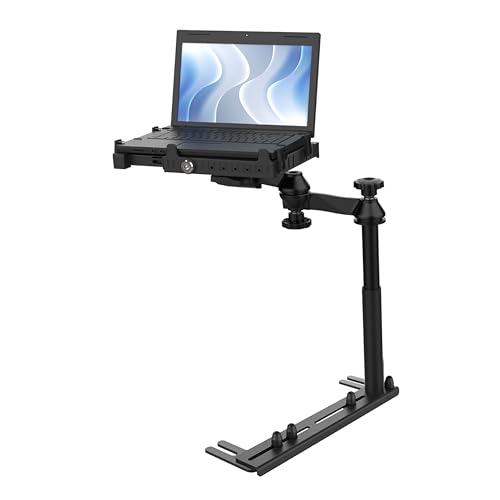
RAM MOUNTS Tough-Tray III Vehicle Laptop Mount
What We Like
- No-drill seat-bolt installation
- Adjustable retaining arms for secure fit
- Dual swing arms with telescoping pole
- AMPS mounting for accessories
Trade-offs
- Requires passenger seat access for installation
- Heavy-duty build adds bulk to cabin
A no-drill seat-bolt mount that fits laptops from 10 to 17 inches means this tray is built for fleet vehicles where every driver needs a stable workstation without permanent modifications. The powder-coated steel and marine-grade aluminum construction, paired with RAM ball-and-socket technology, helps absorb shock and vibration from rough roads. That keeps your laptop secure during field service, inspections, or dispatch work. Dual articulating swing arms and a telescoping pole let you position the screen for comfortable viewing from the driver or passenger seat, and integrated AMPS mounting points let you attach scanners, printers, or handheld devices right alongside the laptop.
This mount relies on passenger seat hardware, so it won’t work in vehicles where that seat is frequently folded or removed for cargo. The RAM Tough-Tray III focuses on rugged stability and accessory expansion rather than active cooling, unlike the MELIPRON mount which includes dual cooling fans. That makes it ideal for professionals who need a durable platform for mobile computing and peripheral gear, but less suited for users who want integrated fan cooling.
Product photos
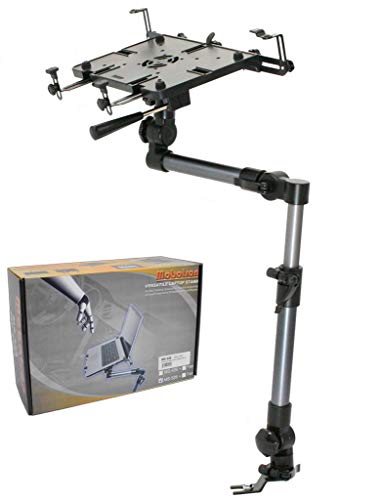
Mobotron MS-526 Heavy Duty Vehicle Laptop Mount
What We Like
- Heavy-duty 30mm telescoping aluminum tube
- Quick lock-in and release levers
- Fits laptops 10" to 17"
- Fully adjustable tray with 180°/360° rotation
Trade-offs
- Requires flat passenger seat rail with accessible bolt
- No cooling fans for extended use
A 30mm telescoping aluminum tube that adjusts from 14 to 21 inches gives this mount the reach and rigidity to hold a full-size laptop steady in a work truck or SUV. The quick lock-in levers let you pop it in or out in seconds. The tray rotates 180 degrees vertically and 360 horizontally, so you can angle the screen exactly where you need it without fighting a wobbly arm.
Installation demands a flat passenger seat rail with an easily accessible bolt, no drilling required, but not every vehicle fits the bill. The Mobotron weighs 6.5 pounds, compared to the heavier MELIPRON mount at 12 pounds, which makes it lighter to handle, though it lacks the dual cooling fans the MELIPRON includes.
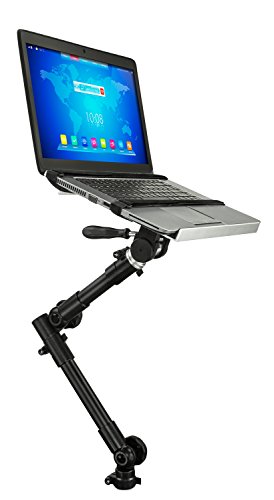
Mount-It! No-Drill Passenger Seat Laptop Stand
What We Like
- Vented tray reduces heat buildup
- Velcro straps secure laptop without tools
- Telescoping arm adjusts height 23-35 inches
Trade-offs
- Fits only 12-15.4 inch laptops, not larger models
- Seat bolt install requires checking airbag clearance
- No cooling fans, relies on passive venting only
Velcro straps hold the laptop securely, and the vented tray helps keep heat from building up during longer parked work sessions. Backed by a lifetime warranty, this is a practical choice for anyone who values speed and simplicity over extra features.
This mount skips active cooling and fits laptops only up to 15.4 inches, so if you need fans or a larger size, the MELIPRON mount includes dual cooling fans. For everyday Chromebooks and standard work laptops that stay within the 9-pound weight limit, the quick-release design makes it easy to set up and stow the workspace quickly. It suits mobile workers who want a passenger-seat desk that disappears as fast as it appears.
Product photos
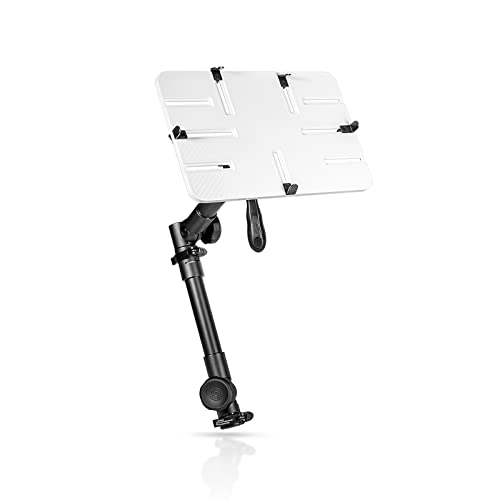
AA-Products T-100AP Aluminum Laptop Mount
What We Like
- No-drill seat-bolt installation
- Full 360° swivel and 180° tilt
- Extendable height from 24 to 36 inches
- Fits laptops 10 to 13 inches
Trade-offs
- Tray only fits laptops up to 13 inches
- ABS plastic tray less durable than aluminum
A maximum laptop size of 13 inches makes this mount a natural fit for compact ultrabooks and smaller notebooks, not the 15- or 17-inch workhorses many mobile professionals carry. The extendable aluminum tube adjusts from 24 to 36 inches, so you can position the screen at eye level whether you’re in a sedan or a tall SUV, and the 360-degree swivel lets you swing it toward the driver or passenger seat without unclamping. For someone running a 12-inch tablet or a lightweight 13-inch laptop for navigation, fleet logging, or quick field notes, the size restriction becomes a strength: the tray stays small and doesn’t block your view of the road. The no-drill seat-bolt mount means you can install it in minutes and remove it just as fast, leaving no permanent marks on your vehicle.
The ABS plastic tray is a different material from the trays on some other mounts. But for daily commuting, light-duty field work, or road trips where you just need a stable place to run maps or music, the T-100AP keeps things simple and secure. The 13-inch limit rules out larger machines, but if your laptop fits, this mount gives you a clean, adjustable setup without drilling.
Product photos
How We Evaluated Car Laptop Mounts
This evaluation is based on manufacturer specifications, expert round-ups, and common themes in owner feedback across the automotive accessory market. We analyzed each mount’s design, materials, and real-world usability based on documented features and user-reported experiences.
The four criteria that mattered most for this category were installation method, stability under vibration, cooling capability, and passenger seat accessibility. No-drill mounts ranked higher for convenience, while bolt-down designs earned points for security. We prioritized mounts with active cooling fans or ventilated trays since laptop overheating is a common complaint in vehicle use.
A research-led evaluation has its limits: we cannot verify long-term durability or fitment for every vehicle model. We relied on manufacturer fitment guides and owner reports of compatibility. Always double-check your vehicle’s seat rail configuration before purchasing, especially for bolt-on models.
What To Look For In Car Laptop Mounts
The right car laptop mount balances security with convenience. You need something that won’t shift during sudden stops but can be removed when you need the passenger seat back.
Focus on installation type, weight capacity, cooling features, and how much cabin space the mount consumes. A mount that’s too heavy to remove easily may become a permanent fixture.
Installation Type: No-Drill vs. Bolt-Down
No-drill mounts attach to existing seat bolts or rails, making them ideal for leased vehicles or drivers who switch cars. Bolt-down mounts require accessing floor seat bolts and offer a more permanent, wobble-free platform. The trade-off is installation time and the need for exposed bolts. Some mounts, like the SPIRRELAB, use a strap-based system with multiple clamps for extra grip without drilling.
Cooling Features: Active Fans vs. Passive Ventilation
Laptops generate significant heat, especially when running field software or GPS navigation in a parked vehicle. Active cooling fans, like the dual USB fans on the MELIPRON and SPIRRELAB mounts, pull heat away from the laptop base. Passive cooling relies on ventilated trays or mesh surfaces. If you run demanding applications for hours, prioritize a mount with active cooling.
Weight and Adjustability
Heavier mounts (10-12 pounds) offer better stability on rough roads but are cumbersome to remove. Lighter mounts are easier to reposition but may wobble. Look for 360° swivel and tilt adjustment for comfortable viewing angles. Telescoping poles help accommodate different driver heights and seat positions.
- Check your vehicle’s seat rail type before buying, some mounts require specific bolt spacing.
- Measure your laptop width to ensure the tray can accommodate it.
- Consider how often you’ll need to free the passenger seat; quick-release designs save time.
- Verify airbag clearance for seat-bolt-mounted units.
- Look for a stabilizer arm if you drive on unpaved roads frequently. A mount that’s too heavy to remove will stay in place, make sure you’re okay with that.
Car Laptop Mounts Compared
The table below compares the nine car laptop mounts we evaluated, highlighting their key features and installation types to help you find the right fit for your vehicle and workflow.
| Product | Weight | Laptop Size | Mount Type |
|---|---|---|---|
| MELIPRON No-Drill Truck Laptop Mount | 12.0 pounds | N/A | No-drill, seat rail bolts |
| VIVO Adjustable Single Laptop Car Mount | 11 lbs | 17 inches | Seat bolt (0°, 90°, 45°) |
| SPIRRELAB No-Drill Car Laptop Mount | 12.3 lb | 9-17 in | No-drill |
| RAM MOUNTS Universal No-Drill Laptop Mount | N/A | 10"–16" | Seat bolt (no-drill) |
| Mount-It! Car Laptop Mount with Stabilizer | 7.1 pounds | 17 inches | No-drill |
| RAM MOUNTS Tough-Tray III Vehicle Laptop Mount | N/A | 10"–17" | Seat-bolt, no drill |
| Mobotron MS-526 Heavy Duty Vehicle Laptop Mount | 6.5 pounds | 10" to 17" | No drilling |
| Mount-It! No-Drill Passenger Seat Laptop Stand | 0.0 pounds | 12-15.4 inches | No-drill |
| AA-Products T-100AP Aluminum Laptop Mount | N/A | 10 to 13 inches | Passenger seat-bolt, no drilling |
Frequently Asked Questions
Will a car laptop mount work with my vehicle?
Most no-drill mounts are designed to fit a wide range of trucks, SUVs, and vans, but compatibility depends on your passenger seat rail configuration. Check the manufacturer’s fitment guide for your specific make and model before purchasing.
Can I still use the passenger seat with a laptop mount installed?
Many mounts feature quick-release poles or detachable workstations that allow the passenger seat to fold forward or recline when the mount is not in use. Some designs, like the Mount-It! Car Laptop Mount with Stabilizer, fold away to free up seat space.
Do I need cooling fans for my laptop mount?
If you run resource-intensive applications like diagnostic software, GIS mapping, or video conferencing, active cooling fans help prevent thermal throttling. For lighter tasks like navigation or note-taking, a ventilated tray may be sufficient.
How much weight can a car laptop mount hold?
Capacity varies widely, from 6.6 pounds on lighter models to over 15 pounds on heavy-duty options. Always check the mount’s weight limit against your laptop’s weight, especially if you use a ruggedized or large-screen model.
Is it safe to install a laptop mount near airbags?
Seat-bolt-mounted laptop stands should be installed only on the passenger seat, never the driver’s seat. Verify that the mount and laptop do not interfere with side airbag deployment zones. Some manufacturers provide specific airbag clearance guidelines.
The Bottom Line
The MELIPRON No-Drill Truck Laptop Mount earns our best overall recommendation for field technicians and contractors who need a sturdy, no-drill solution with active cooling. Its dual USB fans and 360° swivel make it a versatile workstation for rough-road use.
If you need full articulation and don’t mind a bolt-down installation, the VIVO Adjustable Single Laptop Car Mount offers excellent tray adjustability for larger laptops. For those who want maximum wobble reduction, the Mount-It! Car Laptop Mount with Stabilizer includes a dedicated stabilizer arm.
The single most important factor when choosing a car laptop mount is matching the installation method to your vehicle and usage pattern. A no-drill mount suits frequent vehicle changes; a bolt-down design is better for a dedicated work truck. Everything else, cooling, adjustability, weight, follows from that choice.
