
10 Best Huds For Cars in 2026
This post contains affiliate links. As an Amazon Associate, we earn from qualifying purchases.
For drivers who want critical data without taking their eyes off the road, the wiiyii P6 OBD2 Gauge Display HUD is the best overall choice. It combines dual OBD2 and GPS tracking, ten switchable interface layouts, and automatic brightness adjustment. The MH OBD2+GPS Dual System HUD earns the Best Dual System award for drivers who want fault code scanning. The wiiyii OBD/GPS Smart Gauge HUD takes Best Compact Design for those with limited dashboard space.
Choosing the right HUD means matching the device to your vehicle’s compatibility and your own data priorities. Some cars lack an OBD2 port or use a protocol that certain HUDs cannot read, and not every driver needs engine diagnostics like RPM or coolant temperature.
This guide is built from manufacturer specifications, compatibility charts, and common patterns in owner feedback. We focus on the features that matter most for real-world driving so you can find a HUD that fits your car and your daily commute.
Top 10 HUDs For Cars in the Market
Certain content that appears on this site comes from Amazon. This content is provided "as is" and is subject to change or removal at any time.
The Best HUDs For Cars, Reviewed
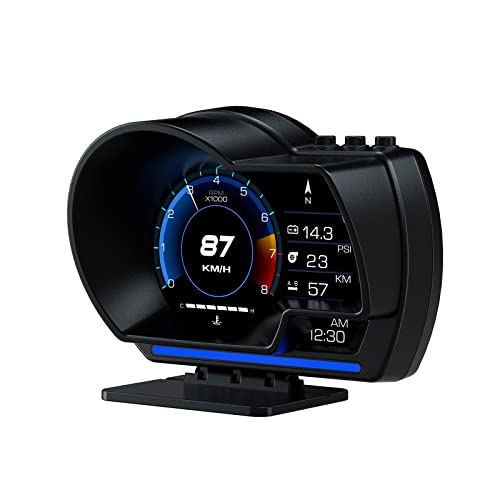
wiiyii P6 OBD2 Gauge Display HUD
What We Like
- Dual OBD2 + GPS for richer data
- 10 switchable interface layouts
- Auto-brightness blue ambient light
- Red light overspeed alarm
Trade-offs
- No OBD2 protocol means GPS-only mode
- Only blue/red ambient light colors
The dual OBD2 and GPS system lets this HUD read over a hundred kinds of vehicle data, and if your car lacks the OBD2 protocol it still works as a GPS-only speedometer. With ten switchable LCD interfaces you can choose which gauges to display, speed, RPM, voltage, fuel consumption, water temperature, without needing to scroll through menus. The ambient light automatically adjusts brightness based on the environment, and it turns red when you exceed your set speed limit, giving you a clear warning without taking your eyes off the road. For drivers who want a full picture of their car’s health and speed in one glance, this unit offers a broad set of features compared to others in the guide.
At 5.2 inches wide and 4.3 inches tall, the P6 is a sizable unit that sits on your dashboard or sticks to the windshield. It’s larger than some competitors, so check your dash space before buying. The ambient light glows blue during normal driving and switches to red when you exceed a set speed, giving you a quick visual alert. That dual-color system is simple but effective for catching your attention without needing to look at the numbers. For drivers who want both OBD and GPS data streams in one display, the size is a reasonable trade-off for the extra information you get at a glance.
MH OBD2+GPS Dual System HUD

What We Like
- Dual OBD2 and GPS modes
- Fault code scanning and clearing
- Customizable speed, temp, voltage, RPM alarms
- 10 interface styles and 8 brightness levels
Trade-offs
- Not compatible with diesel, hybrid, or pickup trucks
- Incompatible with Jeep, Peugeot, Citroen, Fiat, Renault, DS, Lamborghini, SIMCA, Suzuki
- GPS-only mode if car lacks OBD2 compatibility
The MH OBD2+GPS Dual System HUD combines two data sources in one compact unit, letting you use OBD2 diagnostics or GPS satellite tracking. That flexibility makes it a strong fit for drivers who want real-time speed, RPM, water temp, voltage, and even fault code reading without looking down at the dash. It also lets you set alarms for speed, engine temperature, voltage, and RPM, which adds a layer of safety on longer trips. With ten interface options and eight brightness levels, you can dial in the display to match your eyes and lighting conditions.
The trade-off is compatibility: this unit explicitly excludes diesel, hybrid, electric vehicles, pickups, RVs, and several brands including Jeep, Peugeot, Citroen, Fiat, Renault, DS, Lamborghini, SIMCA, and Suzuki. If your car falls into one of those groups, the OBD2 side won’t work, and you’ll be limited to GPS-only functions like speed, altitude, and driving direction. Compared to the wiiyii P6 OBD2 Gauge Display HUD, which also offers OBD and GPS but weighs a bit more and is larger, the MH is lighter and more compact. Both share similar compatibility limits. For owners of compatible gasoline cars after 2008, this dual-system approach gives you a backup data source and diagnostic capability in one small package.
Product photos
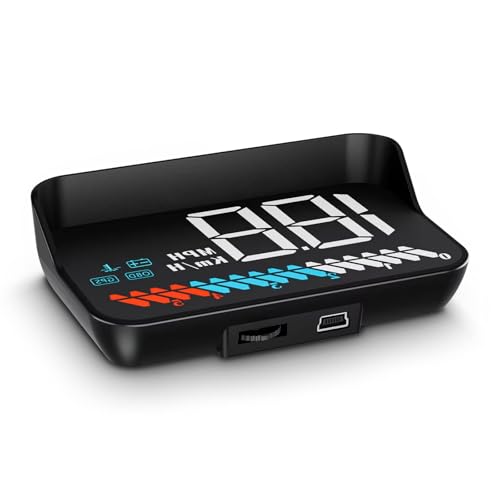
wiiyii OBD/GPS Smart Gauge HUD
What We Like
- Dual OBD and GPS modes for broad compatibility
- Speed, water temp, and voltage alarms included
- Auto-adjusting brightness adapts to ambient light
Trade-offs
- OBD II mode not compatible with EVs, diesels, or RVs
- GPS mode required for pre-2008 vehicles
At just 3.5 inches long and barely an inch tall, this HUD tucks into the tightest dashboard nooks without blocking your view of the road. It pulls speed, water temperature, voltage, and engine RPM straight from the OBD port on most cars built after 2008, then projects them onto the windshield so you never have to glance down at the cluster. The auto-adjusting brightness adapts to changing light conditions, keeping the display readable from dawn to dusk. For someone who wants the core benefit of a head-up display, avoiding the need to look down at the dashboard, without sacrificing precious dash space, this is a tidy, focused solution.
The wiiyii M7 measures just 3.5 inches long and weighs 0.3 pounds, so it fits easily in a glove box or on a compact dashboard without blocking your view. That small size limits its OBD II compatibility, it won’t work with electric vehicles, diesel vehicles, pickup trucks, RVs, or computer-modified cars built before 2008. For those vehicles, switching to GPS mode still gives you speed, voltage, and driving distance, along with speed and voltage alarms. If you drive a newer gas car and want a clutter-free cabin, this little unit gets the job done with minimal footprint.
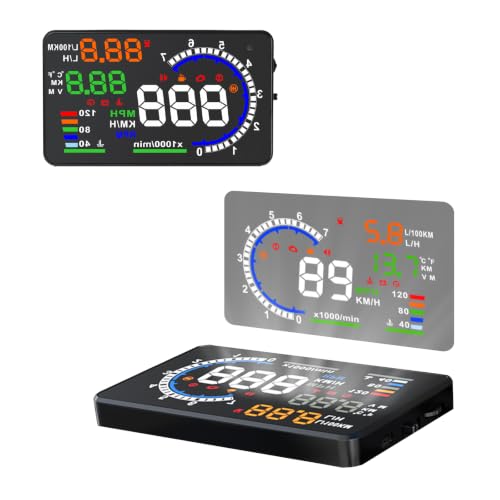
Gopolan 5.5" Large Screen Car HUD
What We Like
- 5.5-inch ultra-large HD display
- Automatic brightness adjustment for day/night
- OBD2 diagnostics with failure code clearing
- Plug-and-play setup via OBD2 port
Trade-offs
- Requires OBD2 port (cars after 2003 only)
- No GPS backup if OBD2 connection fails
A 5.5-inch screen is one of the largest in this guide, and that size makes a real difference when you’re trying to glance at speed or water temp without taking your eyes off the road. The display automatically adjusts its brightness for day or night driving, so you’re not blinded at 2 a.m. or squinting at noon. It reads speed, RPM, water temperature, and voltage straight from the OBD2 port. It can also detect and clear failure codes, a handy bonus for anyone who likes to keep tabs on their car’s health without visiting a shop.
This HUD relies entirely on your car’s OBD2 port, so it won’t work with vehicles older than 2003 or those without the standard protocol. Its slim 0.6-inch depth helps it fit most dashboards, but the wide 4.9-inch length might overhang on tighter surfaces. For someone with a compatible vehicle who values screen real estate above all, this is the one to pick.
Product photos
POCREATION OBD2 HUD Multi Function Gauge

What We Like
- Drowsy driver and anti-sleep alarms
- Auto-dimming for day and night
- No-ghosting HD projection with reflector
- Multi-gauge view on one screen
Trade-offs
- Reflector sticker needed for clean projection
- No GPS fallback if OBD2 signal drops
The built-in drowsy driver alarm and anti-sleep alerts make this the safest pick for long highway stretches. While other HUDs flash a speed warning, this one actively monitors your driving patterns to nudge you when fatigue sets in. The auto light-sensing display adjusts brightness on its own, so you get crisp numbers in direct sun and a soft glow at night without fiddling with buttons. For anyone who regularly drives late or covers hundreds of miles in a sitting, that extra layer of alertness can be a real lifesaver.
You need an OBD2 port and the included reflector sticker to get that clean, ghost-free image. Without the sticker, the projection can look a bit fuzzy on a standard windshield. Compared to the wiiyii P6, which uses both OBD and GPS, the POCREATION sticks to OBD2 data only, so it won’t work in vehicles without an OBD2 interface. But if your vehicle has the port and you prioritize alert features over dual-system flexibility, this HUD delivers the most focused safety package in the guide.
Product photos
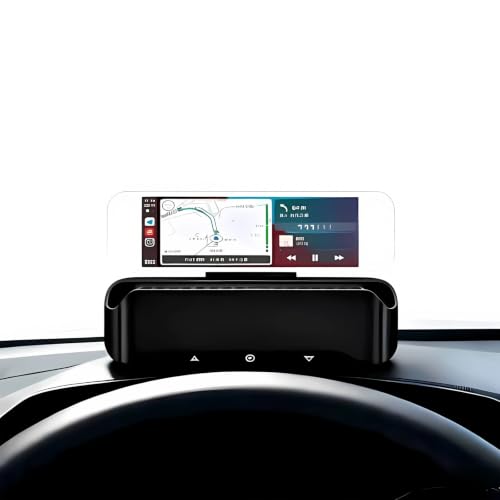
PLEXYNOVAR Wireless CarPlay HUD
What We Like
- Withstands -20°C to 70°C
- Anti-glare screen under direct sunlight
- Non-slip silicone base absorbs vibration
- Voice-activated AI control
Trade-offs
- 2.99" display is smaller than many rivals
- No OBD2 data without optional connection
A 2.99-inch anti-glare display that stays sharp even under direct sunlight and operates reliably from -20°C to 70°C means this HUD won’t quit on you in scorching summers or freezing winters. The non-slip silicone base grips firmly through sharp turns and rough roads, so you never have to reach over and adjust it mid-drive. That makes it the ideal companion for drivers who commute in all seasons or take long road trips through changing climates.
The PLEXYNOVAR HUD is built to survive extreme temperatures from -20°C to 70°C, so it won’t warp or fog up in a scorching summer or freezing winter. It also supports wireless CarPlay and Android Auto with voice-activated AI control, letting you navigate, call, and play music without taking your hands off the wheel. For drivers who need a rugged, hands-free tool rather than a large windshield projection, this is a focused choice.
Product photos
Arestech A8 OBD2 HUD Windshield Projector

What We Like
- Plug-and-play OBD2 setup
- Auto power on/off with ignition
- 5.5-inch colorful display
- Anti-ghosting reflective film included
Trade-offs
- Incompatible with Dodge, Jeep, Mazda, Suzuki
- International compatibility starts at 2008
A 5.5-inch display that projects onto your windshield lets you see speed, RPM, water temp, and fuel consumption while keeping your eyes on the road. The OBD2 setup plugs into your vehicle’s port with no wiring required. This is a good fit for drivers of compatible gas-powered cars from 2004 or later who want a straightforward HUD. The display supports both automatic and manual brightness adjustments, and an anti-ghosting reflective film is included to help with clarity in different lighting.
Product photos
KAOLALI OBD+GPS Dual System HUD
What We Like
- Dual OBD2 and GPS for stable data
- 9 switchable interface layouts
- Multiple alarms including fault code detection
- 180-degree adjustable bracket
Trade-offs
- Requires OBD2 protocol support (cars after 2012)
- Heavier than some competitors at 0.7 pounds
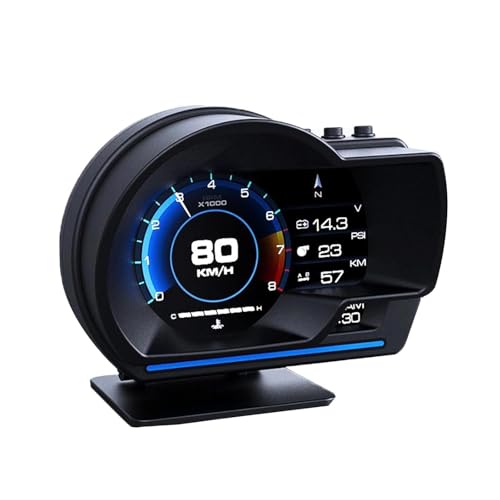
A 3.5-inch TFT color display that pulls data from both OBD2 and GPS means you get stable, rich information without relying on one system alone. The dual setup gives you speed, water temperature, RPM, battery voltage, fuel consumption, turbo readings, and even error-code alerts all in one compact unit. The nine switchable interfaces let you choose the layout that makes sense for your drive. The 180-degree adjustable bracket means you can mount it on the dash or stick it to the windshield and still get a clear view. For someone who wants a full set of gauges without spending on a premium model, this delivers a lot of function per pound.
It only works with cars that support the OBD2 protocol, typically models from 2012 onward, so older vehicles are out of luck. At 0.7 pounds it is noticeably heavier than the wiiyii P6 (0.4 pounds), which matters if you prefer a barely-there windshield mount that stays put over rough roads. Still, the KAOLALI packs in alarms for low voltage, high water temperature, overspeed, fatigue driving, and engine fault codes plus the ability to clear those codes. If your car is OBD2-compatible and you want a versatile, alarm-rich HUD, this is the one to grab.
Product photos
KUOWEIHUD GPS Heads Up Display
What We Like
- USB plug-and-play, no OBD port needed
- Auto brightness adjusts for day or night
- Large font with anti-reflective metal shading
- 10Hz refresh for smooth real-time speed
Trade-offs
- No OBD data like RPM, fuel, or voltage
- Only shows speed, no RPM or fuel data.
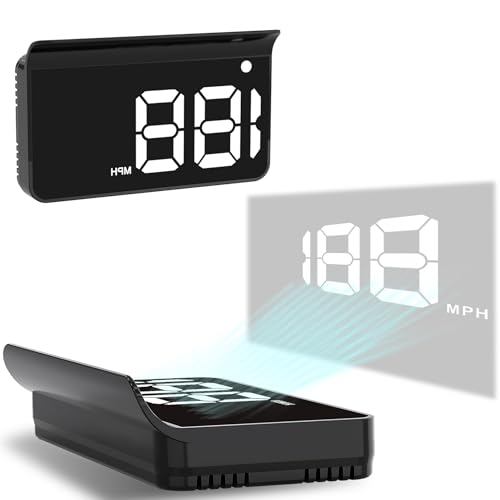
The biggest reason to grab this HUD is that you just plug it into any USB port, no OBD wiring, no setup, so it works with most cars, trucks, and motorcycles. Its dual-mode GPS and BDS system locks onto up to 32 satellites at a 10Hz refresh rate, which means the speed updates smoothly and accurately in real time. For anyone who wants a simple, large-font speedometer that adjusts its brightness automatically for day or night, this is a straightforward solution.
The trade-off for that simplicity is that you give up the extra data that OBD-powered HUDs provide. The wiiyii P6, for example, shows fuel consumption, water temperature, and RPM alongside speed, but it requires plugging into your car’s OBD port. The KUOWEIHUD sticks to speed only, and like any GPS-based unit, signal may be temporarily affected in tunnels or underground garages. If your priority is a no-hassle speed display that works across vehicles and you don’t need engine diagnostics, this is a clean, focused pick. If you want more data from your car’s computer, one of the OBD models would suit you better.
Product photos
SinoTrack 5.5" GPS Speedometer HUD
What We Like
- Extra large 5.5-inch screen
- Auto-adjusting brightness for day/night
- Overspeed and fatigue driving alerts
- Dual-core processor reduces data delay
Trade-offs
- Cannot store total mileage after power off
- Brightness drops if rear sensor hole blocked
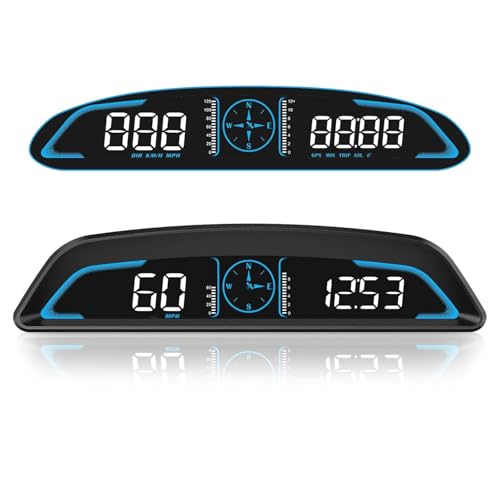
The 5.5-inch screen shows speed, direction, satellite count, and driving time all at once, so you get clear data without hunting through tiny menus. That makes it a natural fit for drivers who want clear data, especially on longer trips where fatigue and overspeed alerts add a layer of safety. The auto light-sensitive display adjusts brightness on its own, so strong sun won’t wash out the numbers.
This HUD relies on GPS and car power, so it can’t keep a running total of your mileage once the engine is off; every trip starts from zero. That’s common for GPS-only units, but if you want odometer-style tracking, some OBD-based models may store trip data through the OBD port. For someone focused on real-time speed and direction with a large readable screen, the SinoTrack delivers that clearly.
Product photos
How We Evaluated HUDs For Cars
We started by reviewing each HUD’s technical specifications from the manufacturer: display size, brightness range, data sources (OBD2, GPS, or both), and the specific vehicle protocols supported. Compatibility is the single most important filter because a HUD that cannot read your car’s data is just a decorative screen.
Our evaluation centered on three criteria. First, data accuracy and richness: does the unit pull from OBD2, GPS, or both, and what parameters does it show? Second, display quality: screen size, auto-brightness, and glare resistance matter for day and night visibility. Third, ease of use: plug-and-play setup, adjustable mounting, and intuitive interface layouts reduce distraction.
A research-led evaluation cannot replace a test drive, but it does reveal which HUDs are most likely to work with your specific vehicle and which features will serve your driving style best. We flag compatibility limits and trade-offs so you know exactly what to check before buying.
What To Look For In HUDs For Cars
Choosing a HUD means balancing your car’s compatibility, the data you actually need, and how the display fits your windshield and driving habits.
Look for a HUD that matches your vehicle’s OBD2 protocol and model year. It should give you the data you will use most often and have a display that stays readable in direct sun and at night.
Vehicle Compatibility
Not every HUD works with every car. OBD2 ports became standard on most gasoline cars in the US after a certain year, but some HUDs only read certain protocols and may not work with diesel, hybrid, or electric vehicles. European, Asian, and domestic brands each use different OBD2 protocols, and many HUDs list specific incompatible makes such as Jeep, Peugeot, or Suzuki.
Always check the manufacturer’s compatibility list against your vehicle’s make, model, and model year. If your car is older than 2008 or lacks OBD2, a GPS-only HUD is usually the better choice.
Display Size and Readability
Screen size ranges from under 3 inches to 5.5 inches diagonally. A larger display is easier to read at a glance but takes up more windshield space. Auto-brightness is critical: a HUD that stays bright at night can be distracting, while one that is too dim in sunlight becomes useless.
Look for anti-glare coatings or included reflective films that prevent ghosting. A HUD with adjustable brightness levels or automatic day/night switching will serve you better across different lighting conditions.
Data Sources and Parameters
- OBD2 connection provides engine data: speed, RPM, coolant temperature, fuel level, voltage, and fault codes.
- GPS connection gives speed, heading, and trip distance without needing the car’s computer, but cannot show engine diagnostics.
- Dual-system HUDs combine both sources for richer data and a backup if one signal drops.
Decide which data you need. If you only want speed, a simple GPS or USB-powered HUD may be enough. If you want engine diagnostics and fault code alerts, choose a dual-system model.
Safety Alerts and Alarms
Many HUDs include configurable alarms for overspeed, high coolant temperature, low voltage, and even driver fatigue. Some models detect drowsy driving patterns and sound alerts to keep you awake on long trips.
A HUD with audible and visual alarms for speed and temperature can prevent engine damage and help you stay alert on long drives.
HUDs For Cars Compared
The table below compares the top HUDs across display size, data sources, key alarms, and vehicle compatibility to help you narrow your choice quickly.
| Product | Display Type / Size | Data Sources | Alerts | Dimensions (Weight) |
|---|---|---|---|---|
| wiiyii P6 OBD2 Gauge Display HUD | LCD, 10 interfaces | OBD2 + GPS dual mode | Overspeed, red ambient light | 5.2 x 3.5 x 4.3 in (0.4 lb) |
| MH OBD2+GPS Dual System HUD | 10 interfaces, 8 brightness levels | OBD2 + GPS dual | Speed, temp, voltage, RPM | 4.3 x 3.3 x 3.0 in (0.3 lb) |
| wiiyii OBD/GPS Smart Gauge HUD | Auto-adjusting brightness | OBD II + GPS | Speed, water temp, voltage | 3.5 × 2.1 × 1.0 in (0.3 lb) |
| Gopolan 5.5" Large Screen Car HUD | 5.5 inches | OBD2/EOBD | Voltage, water temp alerts | 4.9 x 0.6 x 3.0 in (0.4 lb) |
| POCREATION OBD2 HUD Multi Function Gauge | HD projection with anti-glare | OBD2 interface | Speed warning, drowsy driver, anti-sleep | N/A |
| PLEXYNOVAR Wireless CarPlay HUD | 2.99" (800×268 PX) | Wireless CarPlay & Android Auto | N/A | N/A |
| Arestech A8 OBD2 HUD Windshield Projector | 5.5 inches | OBD II gasoline vehicles | Overspeed warning | 5.1 x 3.0 x 0.5 in (0.6 lb) |
| KAOLALI OBD+GPS Dual System HUD | 3.5 inch TFT color | OBD2 + GPS dual | Speed, temp, voltage, RPM, fault code | N/A (0.7 lb) |
| KUOWEIHUD GPS Heads Up Display | Large font display | GPS + BDS | N/A | 2.8 × 1.7 × 0.8 in (0.1 lb) |
| SinoTrack 5.5" GPS Speedometer HUD | 5.5 inch LCD | GPS | Overspeed + Fatigue | 6.6 x 1.6 x 1.7 in (0.2 lb) |
Frequently Asked Questions
Will a HUD work with my car?
It depends on your vehicle’s make, model, and year. Most HUDs connect to the OBD2 port, which has been standard on US gasoline cars for many years, but some brands and diesel, hybrid, or electric vehicles use different protocols that are not supported. Check the manufacturer’s compatibility list before buying.
What is the difference between OBD2 and GPS HUDs?
An OBD2 HUD pulls data directly from your car’s computer, showing engine parameters like RPM, coolant temperature, fuel use, and fault codes. A GPS HUD uses satellite signals to display speed and heading only, without engine data. Dual-system HUDs offer both for maximum information.
Do I need a HUD with automatic brightness?
Yes, automatic brightness is highly recommended. A HUD that is too bright at night can be distracting, while one that is too dim in direct sunlight becomes unreadable. Auto-adjusting models switch between day and night modes to keep the display clear without manual adjustment.
Can a HUD read and clear check engine codes?
Some OBD2 HUDs can read and clear diagnostic trouble codes, letting you check engine warnings without a separate code reader. This feature is listed as fault code scanning or failure code clearing. Not all HUDs offer this, so check the product details if diagnostics matter to you.
Is it legal to use a HUD while driving?
Yes, HUDs are legal in most places because they project information onto the windshield so you can see it without looking away from the road. Check your local laws for any restrictions on windshield-mounted devices or reflective films.
The Bottom Line
The wiiyii P6 OBD2 Gauge Display HUD is the best overall choice for drivers who want a full set of vehicle data from both OBD2 and GPS sources, with ten interface layouts and automatic brightness. It is ideal for those driving compatible gasoline cars who value information richness and customization.
If your car is not compatible with the P6 or you have a tighter budget, the KAOLALI OBD+GPS Dual System HUD offers a strong dual-system feature set at a more affordable price. For drivers who only need speed data and want the simplest setup, the KUOWEIHUD GPS Heads Up Display works in any vehicle via USB power.
The single most important buying decision is compatibility. Confirm your vehicle’s make, model, and year against the HUD’s supported protocols before choosing. Get that right, and you will have a helpful driving companion for years.
